


Push or pull: which should power your integration stack?
You probably heard webhooks are for “real-time” and APIs are for “requests,” but that gloss misses the tradeoffs teams face.
Webhooks fire a POST to your endpoint when an event occurs (push), while APIs return data only after you ask (pull).
This post explains the practical differences—latency, polling cost, reliability—and shows when to use webhooks, when to use APIs, and why a hybrid pattern (webhook notify + API fetch) often wins.
Quick Explanation of Webhooks and APIs

Webhooks send data automatically when an event occurs. APIs require a request to retrieve data. That’s the difference. Webhooks push information, APIs pull it.
A webhook is an event-driven HTTP callback. When something happens inside a system (new payment, form submission, file upload) the webhook fires a POST request to a pre-configured URL with event data. The receiving system gets notified instantly without asking.
An API is a request-driven interface. A client sends a request (GET, POST, PUT, DELETE) to a server, and the server responds with the requested data or confirms an action. If you want fresh data from an API, you must ask for it. Either manually or on a schedule.
Here are the main distinctions:
Communication direction: Webhooks push data from server to client. APIs require the client to pull data from the server.
Initiation: Webhooks are triggered by events. API calls are triggered by the client.
Real-time delivery: Webhooks deliver updates the moment events occur. APIs deliver data only when requested.
Polling requirements: Webhooks eliminate polling. APIs often require repeated requests to check for changes.
Example: A webhook notifies a system instantly about a new payment. An API requires checking for updates manually or on schedule. Before switching to webhooks, our team polled the payment API every 30 seconds and still missed events that happened in between.
In‑Depth Look at How Webhooks Work

Webhooks rely on event triggers, POST requests, and pre-configured URLs. They provide real-time updates and reduce polling. When a monitored event occurs (user unsubscribes, meeting starts, inventory falls below a threshold) the webhook mechanism automatically sends a POST request containing event details to the endpoint you registered.
The receiving endpoint must be publicly accessible over HTTPS. When the POST arrives, your endpoint processes the payload (usually JSON or XML), validates it, and quickly returns a success status code. Typically 200 OK. If your endpoint fails to respond or returns an error, most providers retry the delivery with exponential backoff. Webhooks are one-way. They deliver data but don’t expect a response payload beyond the acknowledgment status code.
Common use cases include notifications (email bounces, link clicks), automation (syncing CRM records when leads arrive), and integrations (posting messages into team channels when external events occur). Because webhooks eliminate the need to poll an API repeatedly, they reduce server load and bandwidth while enabling near-instant event delivery. Often with latency measured in milliseconds.
The typical webhook process follows these steps:
- Event trigger: A monitored condition or action occurs inside the source system (new order placed, file uploaded, subscription canceled).
- POST request: The webhook service constructs an HTTP POST request containing a JSON or XML payload describing the event.
- Payload delivery: The POST is sent to the pre-configured URL you registered during webhook setup.
- Validation: Your endpoint verifies the payload using HMAC signatures, shared secrets, or timestamps to confirm authenticity and prevent replay attacks.
- Acknowledgment: Your endpoint responds with a 200 status code to confirm receipt. The sender’s retry logic stops. Event processing continues asynchronously in a background worker or queue.
In‑Depth Look at How APIs Work

APIs operate through request/response cycles. A client initiates a request to a server endpoint, and the server processes the request and returns a structured response. APIs can use GET, POST, PUT, DELETE, and other HTTP methods. They’re flexible, controlled, and suited for retrieving structured data. They require polling to check for changes.
The client sends an HTTP request with headers (often including an Authorization token), optional query parameters or body payload, and the server responds with a status code and data (usually JSON). For example, a GET request to /users/123 with a valid API key returns user details. A POST to /orders with order data creates a new order and returns a confirmation. APIs are synchronous by default. Each request receives an immediate response, making them predictable and easier to debug than asynchronous event flows.
APIs are ideal for on-demand operations: searching, filtering, updating records, performing transactions, and retrieving large datasets with pagination. If you need the latest weather, stock price, or shipment status, you send an API request when you need it. This gives precise control over what data you fetch and when. But it means you must poll the API repeatedly if you want near-real-time updates, which can increase request volume, consume rate limits, and waste resources checking for changes that haven’t occurred.
| API Method | Primary Use |
|---|---|
| GET | Retrieve data without modifying server state (fetch user profile, list orders) |
| POST | Create new resources or submit data (create account, submit form, process payment) |
| PUT / PATCH | Update existing resources (PUT replaces entire record, PATCH modifies specific fields) |
| DELETE | Remove resources (delete a file, cancel a subscription) |
Use Cases: When to Choose Webhooks vs APIs

Webhooks are ideal for real-time notifications. When you need to know the moment something happens (payment clearing, user clicking a link in an email, sensor crossing a threshold) webhooks deliver that event instantly without forcing you to poll an endpoint every few seconds. They’re event-driven and one-way. The source system pushes data to your registered endpoint, reducing unnecessary API calls and server load.
APIs are ideal for on-demand data retrieval, bulk data operations, and systems requiring verification before action. Use an API when you need to search a catalog, pull detailed analytics, update a record based on user input, or fetch data conditionally (retrieve traffic data only when a user opens a map). APIs give you full control over what you request, when you request it, and how you handle the response. They support complex queries, pagination, filtering, and multi-step workflows that require reading state before writing changes.
Many systems use both. A common hybrid pattern is to rely on webhooks for immediate event notifications and APIs to fetch full details or reconcile state. A webhook might notify your system that a new order was placed, and your system then calls an API to retrieve the complete order details, customer history, and inventory status before processing the fulfillment. This combination reduces polling waste while preserving the flexibility to query on demand.
Specific real-world use cases include:
Webhooks: Payment transaction status updates (PayPal, Stripe), chat message notifications (Slack incoming webhooks), email event tracking (bounces, opens via Event Webhook), inventory threshold alerts (“notify me when stock drops by 5% in a day”), IoT sensor streams, inbound email parsing (Inbound Parse Webhook), security alerts (failed login attempts, suspicious activity).
APIs: User search and lookup (places API, mapping integrations), scheduled reports and analytics exports, payment processing workflows (PayPal APIs for subscriptions and invoicing), music catalog queries (Spotify search and playlist APIs), ride-hailing location and trip data (Uber APIs), sending transactional email programmatically (Email API), multi-factor authentication login flows, bulk data imports with pagination and retries.
Advantages and Limitations of Each

Webhooks reduce server load and enable instant communication. By pushing data only when events occur, they eliminate repeated polling requests, saving bandwidth, CPU cycles, and database I/O. Webhooks deliver near-real-time updates with latency often measured in milliseconds, making them the best choice for time-sensitive notifications. They also simplify client logic. Instead of running a scheduler to poll an API every minute, you configure a webhook and process events as they arrive.
APIs provide control and flexibility but may suffer from high polling frequency and rate limits. Polling an API frequently enough to simulate real-time updates can consume significant resources, hit rate limits, and still introduce latency (if you poll every 30 seconds, the average delay before detecting an event is 15 seconds). APIs require managing authentication tokens, handling pagination for large datasets, and implementing retry logic for transient errors. However, APIs offer synchronous responses, precise control over what data you request, and the ability to query historical data or perform complex filters that webhooks can’t support.
| Technology | Advantage or Limitation |
|---|---|
| Webhook | Advantage: Near-instant event delivery with low latency (milliseconds) |
| Webhook | Advantage: Reduces polling overhead and API call volume |
| Webhook | Limitation: Requires publicly accessible HTTPS endpoint and high availability |
| API | Advantage: Controlled, on-demand access with synchronous error handling |
| API | Advantage: Supports complex queries, filtering, pagination, and bulk operations |
| API | Limitation: Frequent polling increases load, consumes rate limits, and introduces latency |
Implementation Examples
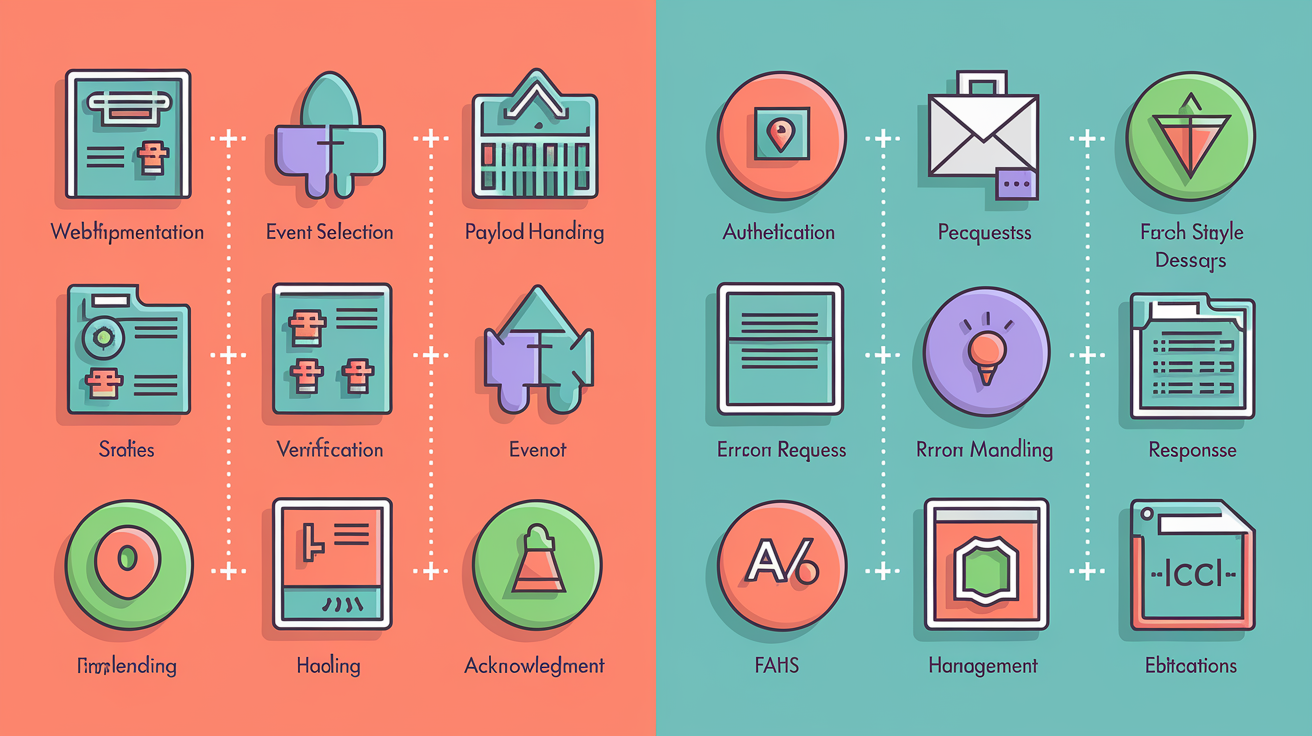
Webhook setup requires URL registration and payload handling. API implementation requires authentication, endpoint requests, and parsing responses. Both may use JSON payloads.
Webhook Implementation Example
Registering a webhook starts with providing a publicly reachable HTTPS endpoint to the service you’re integrating. You select which event types to subscribe to (for example, “payment.succeeded,” “user.unsubscribed,” “file.uploaded”). When those events occur, the provider sends a POST request with a JSON payload to your endpoint. Your server must validate the payload, typically by verifying an HMAC signature or shared secret included in request headers, then acknowledge receipt with a 200 status code and process the event asynchronously in a background worker or queue.
- Registration: Configure the webhook URL in the provider’s dashboard or API. Subscribe to specific event types to avoid unnecessary traffic.
- Event selection: Choose only the events your application needs (e.g., “order.created,” “shipment.delivered”). Over-subscribing increases load and noise.
- Payload handling: Parse the incoming JSON body. Extract event metadata (type, timestamp, resource ID) and relevant data fields.
- Verification: Verify the request signature (HMAC-SHA256 or similar) using a shared secret. Check timestamps to prevent replay attacks. Respond 200 OK immediately to acknowledge receipt, then enqueue the event for background processing to avoid blocking the webhook sender’s retry timeout.
API Implementation Example
API implementation begins with authentication, usually OAuth2 tokens or API keys passed in request headers. You construct an HTTP request (GET to retrieve data, POST to create or update) with required parameters, send the request to the endpoint, and parse the JSON or XML response. Error handling is critical. Check status codes (200 success, 400 bad request, 401 unauthorized, 429 rate limit, 500 server error) and implement retries with exponential backoff for transient failures.
- Authentication: Obtain an API key or OAuth2 access token. Include it in the
Authorizationheader (e.g.,Authorization: Bearer YOUR_TOKEN). Manage token refresh and expiration. - Sending a request: Construct the HTTP request with method (GET, POST, PUT, DELETE), endpoint URL, query parameters or JSON body, and headers. Use libraries like
fetch,axios, orrequeststo send the call. - Receiving data: Parse the JSON response. Extract the data you need. Handle pagination if the response includes
next_pagecursors or offset/limit parameters. - Handling errors: Check the HTTP status code. Retry on 5xx errors and 429 rate limits with exponential backoff. Log failures and surface user-friendly messages. Implement circuit breakers if the API becomes consistently unavailable.
Performance and Scalability Considerations

Webhooks reduce requests and server load by delivering data only when events occur. Instead of polling an API every few seconds and receiving “no changes” responses 99% of the time, webhooks push notifications the instant something happens. This eliminates wasted bandwidth, CPU cycles, and database queries. For high-volume event streams (tracking user activity or processing payment notifications) webhooks can handle hundreds of thousands of events per hour with lower infrastructure costs than equivalent polling systems.
APIs may require multiple calls and can hit rate limits under heavy use. If you poll an API every 10 seconds to check for updates, you consume 8,640 requests per day per resource, even if nothing changes. High-frequency polling burns through rate limits (many APIs cap requests at 1,000 to 10,000 per hour), increases latency (you’re always 5 seconds behind on average with 10-second polls), and wastes server resources on both sides. Optimizing API performance requires caching (ETags, TTL headers), cursor-based pagination for large datasets, and smart retry logic with exponential backoff to avoid overwhelming the server during transient failures.
High-volume webhook systems must handle retries and queueing. When your endpoint is slow or temporarily unavailable, providers retry deliveries, typically 3 to 5 attempts with exponential backoff. If your processing logic is complex or depends on downstream services, enqueue incoming webhook payloads immediately and process them asynchronously in background workers. Use dead-letter queues to capture failed events for manual review, implement idempotency keys to prevent double-processing if a retry succeeds after you already handled the first attempt, and monitor delivery latency and success rates to catch issues before they cascade.
Decision Guide: Choosing Webhooks or APIs

Companies often use both technologies. Use webhooks for real-time event-driven workflows. Use APIs for controlled, on-demand retrieval. Choosing depends on data freshness needs, system architecture, and frequency of updates.
Pick webhooks when you need instant notifications and can handle asynchronous event delivery. If your application must react the moment something happens (sending an alert when a sensor crosses a threshold, posting a message when a lead arrives, triggering a workflow when a payment clears) webhooks deliver those events with minimal latency and eliminate polling overhead. Webhooks are one-way. They notify you, but you can’t query them for historical data or complex filters. Plan for endpoint availability, signature verification, retries, and idempotency handling.
Pick APIs when you need on-demand control, complex queries, or two-way transactions. If your workflow requires searching a catalog, fetching user details conditionally, updating records based on form input, or pulling bulk data with pagination, APIs give you the flexibility to request exactly what you need when you need it. APIs are synchronous and predictable, making them easier to debug than asynchronous webhooks. However, if you need near-real-time updates, you’ll have to poll frequently, which increases load and may hit rate limits. For best results, combine webhooks for immediate event triggers with APIs for detailed fetches and reconciliation.
Key decision factors include:
Data freshness: Need instant updates? Use webhooks. Can tolerate a few seconds or minutes of delay? Polling an API may be simpler.
Event frequency: High-volume, frequent events favor webhooks (lower overhead). Occasional checks or user-initiated actions favor APIs.
System architecture: Can you expose a public HTTPS endpoint and maintain high availability? If yes, webhooks work. If your services are behind strict firewalls or you prefer outbound-only traffic, stick with API polling.
Complexity and control: Need to query, filter, or paginate results? APIs offer more flexibility. Just reacting to events? Webhooks are more efficient.
Hybrid approach: Many robust integrations use webhooks to receive event triggers and APIs to fetch full resource details, verify state, or perform follow-up actions. We get a webhook when an order ships, then call the API to pull tracking details and update our dashboard.
Final Words
Now you’ve got the quick definitions and the deep dives: webhooks push events automatically; APIs pull data on request.
You saw how webhooks send POSTs on triggers, how APIs run request/response cycles, and the common tradeoffs like retries, polling, and rate limits.
Use webhooks for real-time notifications, APIs for controlled on-demand access, or both where it makes sense. This webhook vs api guide should help you pick the right tool and move faster with less friction.
FAQ
Q: What are webhooks used for?
A: Webhooks are used for sending real-time notifications and automations when events occur, such as notifying billing of a new payment, triggering CI jobs, or syncing records between systems.
Q: What are the 4 types of API?
A: The four main API types are REST (resource-oriented HTTP), SOAP (XML-based, strict), GraphQL (client-driven queries), and gRPC (binary RPC suited for high-performance services).
Q: What are the disadvantages of webhooks?
A: The disadvantages of webhooks include delivery failures, security risks if endpoints are exposed, harder debugging, and requiring receiver uptime plus retry/queueing logic to handle spikes or missed events.
Q: Is a webhook just a URL?
A: A webhook is not just a URL; it’s a configured endpoint plus the event-triggered POST payload, signature/validation, and delivery logic that enable real-time push from sender to receiver.