


Ever spent two hours debugging a webhook integration only to discover you were processing fake data from a bot? Most developers skip webhook validation during initial setup, then scramble to add it after the first security incident or data corruption bug. Here’s the catch: validating webhook payloads isn’t optional security theater. It’s the difference between trusting incoming data and actually verifying it came from who you think, with the structure you expect, before it touches your database or triggers actions in your system.
Webhook Payload Validation Methods and Tools Overview

Webhook payload validation protects your application from malicious data by checking incoming requests before you process them. Here’s what you need to know:
- Signature verification uses HMAC authentication to confirm sender identity and catch payload tampering
- Schema validation relies on JSON Schema to enforce data structure and spot malformed payloads
- Timestamp validation stops replay attacks by rejecting old or future dated requests
- Tool based validation through libraries and testing utilities that make implementation easier
Webhook payload validation verifies that incoming HTTP POST requests actually come from the claimed external service and contain properly structured data. This verification happens before your application processes the payload, acting as a security checkpoint that confirms both sender identity and data integrity.
The fundamental security problem is pretty straightforward. Webhook endpoints with predictable patterns like /webhooks/stripe, /webhooks/github, or /webhook/mailgun are easily discoverable. Anyone can learn webhook payload formats from public documentation, craft a fake payload, and send malicious data directly to your application. Without validation, your system processes these forged requests as if they came from the legitimate provider.
Available tools and libraries simplify implementation across programming languages. The API Testing Tools ecosystem includes webhook formatters, signature validators, HMAC generators, and schema validators that help during both development and production deployment.
Skipping validation creates serious problems. Your application might process malicious payloads designed to exploit business logic, corrupt your database with fake transactions, or trigger unintended actions. Data integrity breaks down when you can’t trust the source of your incoming events.
Implementing HMAC Signature Verification for Webhooks

Signature verification is the most common authentication method for webhooks because it creates cryptographic proof that both parties share the same secret key. This confirms the sender’s identity while detecting any payload tampering during transmission.
Understanding the HMAC Signature Process
When a webhook provider sends a request, they generate a hash of the payload body using a secret key that only you and they know. This signature gets included in a request header (commonly X-Signature, X-Hub-Signature-256, or similar). The signature acts as a sealed envelope. If anyone modifies the payload in transit, your calculated signature won’t match theirs, revealing the tampering.
Complete Verification Implementation
Here’s how to verify webhook signatures:
- Retrieve the signature from incoming request headers using the provider’s documented header name
- Extract the raw payload body before any parsing or modifications (signature calculation requires the exact bytes received)
- Obtain your secret key from environment variables where it’s securely stored
- Generate your own HMAC hash using the same algorithm the provider uses (SHA-256, SHA-1, or MD5)
- Use timing safe comparison to prevent timing attacks where attackers measure response times to guess signatures
- Compare your generated signature with the provided signature character by character
- Reject mismatched requests immediately with a 401 status code and log the validation failure
Code Example for Signature Validation
Here’s a practical Node.js example showing signature verification. This code shows how Stripe webhooks verify signatures by comparing your calculated HMAC with the signature they provide in the Stripe-Signature header, using a timing safe comparison to prevent attackers from guessing valid signatures through response time measurements.
const crypto = require('crypto');

function verifyWebhookSignature(payload, signature, secret) {
  const calculatedSignature = crypto
    .createHmac('sha256', secret)
    .update(payload, 'utf8')
    .digest('hex');

  return crypto.timingSafeEqual(
    Buffer.from(signature),
    Buffer.from(calculatedSignature)
  );
}
Security best practices require HTTPS/TLS encryption for all webhook endpoints, even with signature validation. Store secrets in environment variables, never in code repositories. Implement rate limiting on webhook endpoints to prevent brute force signature guessing. Log all validation attempts, including timestamps and signature verification results, to detect potential attacks. Check the Environment Configuration Best Practices when setting up secure secret key storage.
Each provider uses different header names and hashing algorithms. Consult their API documentation security sections for exact implementation details, including whether they use base64 encoding, hex encoding, or raw bytes for signature transmission.
Validating Payload Structure with JSON Schema

JSON Schema defines the expected structure of webhook payloads, letting you verify that incoming data contains the right fields, types, and formats before your application logic processes it. This catches provider changes, malformed data, and integration errors early.
Schema based validation matters because signature verification only confirms who sent the payload and that it wasn’t modified. It doesn’t verify that the payload contains valid data your application can actually process. A correctly signed webhook could still have missing required fields, wrong data types, or unexpected nested structures that crash your code.
Common validation checks include type checking (ensuring strings are strings, numbers are numbers, booleans are booleans), required field presence (confirming essential data exists), optional parameter handling (allowing but not requiring certain fields), string format validation (checking email addresses, URLs, UUIDs match expected patterns), and numeric constraints (verifying values fall within acceptable ranges). These checks prevent your application from attempting to process incomplete or incorrectly formatted data.
| Validation Type | Purpose | Example |
|---|---|---|
| Type validation | Ensures fields match expected data types | “amount” must be a number, not a string |
| Required fields | Confirms essential data is present | Every order webhook must include “order_id” |
| Format validation | Verifies strings match specific patterns | “email” must be a valid email address format |
| Range constraints | Checks numeric values fall within limits | “quantity” must be between 1 and 1000 |
| Pattern matching | Tests strings against regex patterns | “phone” must match international phone format |
When validation errors occur, respond with a 400 status code and provide clear error messages that help the webhook sender fix their integration. Include which field failed validation and why, like “Missing required field: customer_id” or “Invalid format for field email: expected valid email address.” Meaningful error messages speed up debugging for both parties.
Maintain schema versions for backward compatibility when providers update their webhook formats. Version your schemas and support older versions for a transition period, allowing providers to migrate gradually without breaking existing integrations.
Handling Different Webhook Payload Types

Some webhook providers send different payload structures to the same endpoint, creating a routing challenge. You might receive validation requests, regular event notifications, and special system messages all at the same URL, each requiring different processing logic.
The challenge of dual payload structures shows up clearly in real world integrations. Zoom Contact Center sends validation requests to webhooks every 72 hours with a completely different structure than regular event payloads. Your webhook accepts any payload structure regardless of what you defined during initial setup, so you need logic to handle both types correctly.
Strategies for handling multiple payload types:
- Router logic with event key filters. Check an event type field first, then route to appropriate validation and processing logic.
- Conditional parsing based on payload structure. Detect which fields are present to determine payload type before full parsing.
- Separate validation paths. Apply different schema validation rules depending on the detected payload type.
- Fallback routes for unexpected types. Create a catch all handler for payload structures you haven’t seen before.
- Flexible schema definitions. Use union types or conditional schemas that accommodate multiple valid structures.
Testing with mock payloads representing each payload type during development prevents production surprises. Create sample JSON files for validation requests, regular events, error notifications, and any special message types your provider sends. Run your routing logic against all samples to confirm each payload reaches the correct processing path and passes the right validation checks.
Logging different payload types helps you monitor integration health and debug issues. Record the event type, payload structure fingerprint, processing path taken, and validation results for each webhook. This audit trail reveals when providers introduce new payload types or change existing structures.
Essential Validation Libraries and Tools

Using existing validation libraries and tools saves development time and reduces security mistakes compared to building everything from scratch.
| Tool/Library | Language | Primary Use |
|---|---|---|
| svix-webhooks | Node.js | Signature verification with multiple algorithm support |
| flask-webhook | Python | Flask middleware for webhook validation and routing |
| webhook-verifier | Ruby | Generic webhook signature validation gem |
| webhook-verify | PHP | PSR-7 compatible webhook authentication |
| ajv | JavaScript | Fast JSON Schema validation for payloads |
| crypto (built-in) | Node.js/Python | HMAC generation and timing safe comparison |
Online testing tools simplify development and debugging. Webhook formatters pretty print incoming payloads and highlight structure. Signature validators let you paste a payload, secret, and signature to verify your HMAC generation matches the provider’s. Payload inspectors automatically detect event types, timestamps, and nested structures without writing parsing code.
Creating mock webhook payloads and using simulation tools lets you test without triggering actual webhook calls from providers. Build JSON samples representing every event type your integration handles. Use these mocks with Parse JSON modules or similar testing utilities to verify your validation logic, routing decisions, and error handling paths work correctly before connecting to live webhook sources.
Integration testing frameworks specific to webhook validation help catch issues before production. These frameworks simulate webhook delivery, verify your signature validation rejects forged payloads, confirm schema validation catches malformed data, and test retry handling when your endpoint returns error status codes.
Validation Implementation Across Popular Webhook Providers
Validation methods and implementation details vary significantly by provider, so you’ll need to consult provider specific documentation for exact procedures.
Stripe Webhook Validation
Stripe includes signatures in the Stripe-Signature header, which contains a timestamp and one or more signature hashes. You’ll find your webhook signing secret in the Stripe Dashboard under Developers → Webhooks. Stripe’s official SDKs provide built in verification methods like stripe.webhooks.constructEvent() that handle signature parsing, HMAC generation, timestamp validation, and comparison automatically.
GitHub Webhook Security
GitHub uses HMAC-SHA256 signatures sent in the X-Hub-Signature-256 header as a hex encoded string prefixed with sha256=. Your secret key is set when configuring the webhook in repository settings. GitHub also sends a X-Hub-Signature header with SHA-1 for backward compatibility, but SHA-256 is recommended for new integrations.
Shopify Webhook Authentication
Shopify sends HMAC-SHA256 signatures in the X-Shopify-Hmac-SHA256 header as a base64 encoded string. You’ll find your shared secret in the Shopify admin panel under Settings → Notifications → Webhooks or in your app settings if you’re building a Shopify app. Shopify’s validation requires base64 decoding their signature before comparison.
Consult each provider’s API documentation and security sections for implementation details specific to their system. Well documented providers include complete code examples, explain their signature generation process, and provide troubleshooting guidance for common integration issues.
Documentation sections to check:
- Authentication/security pages usually contain signature verification procedures and secret key management
- Webhook setup guides often include validation examples alongside endpoint configuration instructions
- SDK examples show idiomatic validation code in multiple programming languages
- Troubleshooting sections address common validation failures and debugging techniques
Providers without documented validation methods create a security risk. If a service sends webhooks but offers no signature verification, IP allowlisting, or authentication mechanism, reconsider whether the integration is worth the security exposure it creates.
Testing and Debugging Webhook Validation

Testing validation logic before production deployment catches integration bugs, security gaps, and edge cases that break processing under real world conditions.
Creating mock payloads representing different scenarios is essential for thorough testing. Build valid payloads with correct signatures that should pass validation. Create invalid signature payloads where the signature doesn’t match the body content. Construct malformed data payloads with missing fields, wrong types, or invalid formats. Generate expired timestamp payloads that fall outside your acceptable time window. These test cases verify your validation logic handles all paths correctly.
Testing workflow steps:
- Create sample payloads for each scenario (valid signatures, invalid signatures, malformed data, expired timestamps, unknown event types)
- Set up test endpoints in your development environment that mirror production configuration
- Simulate signature generation using the same secret keys and algorithms your provider uses
- Verify your validation logic rejects invalid requests with appropriate status codes and error messages
- Test error handling paths to ensure failures don’t crash your application or expose sensitive information
Using Parse JSON modules or similar tools simulates webhook structures during development without triggering actual webhook calls from providers. These modules let you paste sample payloads and test your processing logic in isolation. You can create separate Parse JSON modules for each payload type, test routing decisions, and verify data extraction works correctly before connecting to live webhook sources.
Logging validation attempts, including both successful and failed validations, provides monitoring and debugging capabilities. Record the timestamp, event type, signature verification result, schema validation result, and processing outcome for each webhook. This audit trail helps you spot integration problems, detect potential attacks through unusual validation failure patterns, and debug issues when providers change their webhook formats.
Common Payload Validation Errors and Solutions
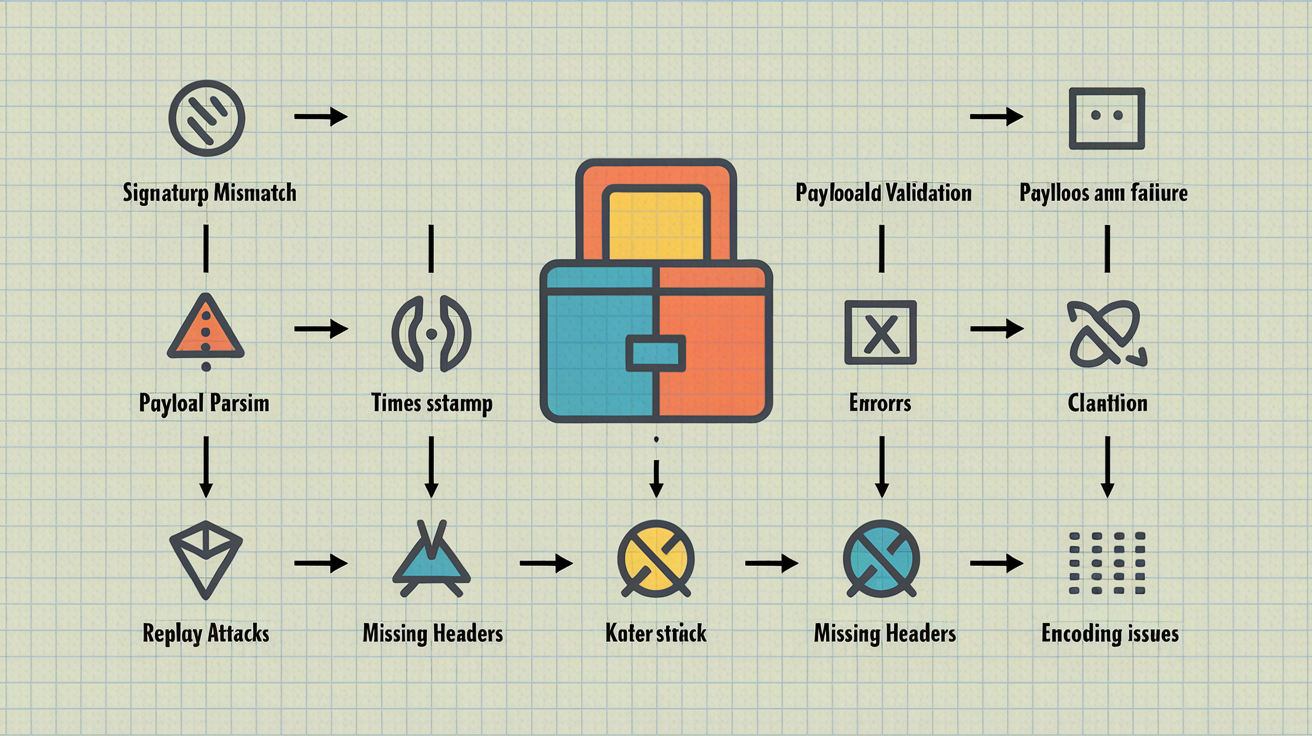
Understanding frequent validation failures and their fixes speeds up troubleshooting when webhooks stop working.
| Error Type | Cause | Solution |
|---|---|---|
| Signature mismatch | Incorrect secret key or wrong hashing algorithm | Verify secret matches provider’s value and confirm SHA-256 vs SHA-1 |
| Timestamp validation failure | Clock skew between systems | Implement 5-10 minute tolerance window for timestamp checking |
| Payload parsing errors | Malformed JSON or encoding issues | Validate content-type header and check character encoding before parsing |
| Replay attacks | Attacker reusing previously valid payloads | Track processed webhook IDs in database to prevent duplicate processing |
| Missing headers | Incomplete requests or wrong endpoint configuration | Check required header presence before validation and log which headers are missing |
| Encoding issues | Character set mismatches or line ending differences | Normalize payload encoding to UTF-8 and handle CRLF vs LF consistently |
Implementing proper error responses with appropriate status codes communicates validation results clearly. Return 401 Unauthorized for authentication failures where signatures don’t match, indicating the request didn’t come from the claimed source. Send 400 Bad Request for malformed payloads that fail schema validation or can’t be parsed. Use 200 OK for successful validation even if you choose to ignore the webhook after verification passes.
Providing helpful error messages aids debugging without exposing security details. Include which validation step failed (“signature verification failed” or “missing required field: order_id”) without revealing your secret keys, internal system details, or validation algorithms. Generic messages like “payload structure invalid” help legitimate integrators fix their code while giving attackers minimal information.
Monitoring validation error rates detects potential attacks or integration problems early. A sudden spike in signature mismatches might indicate an attack attempt or that your provider rotated their signing secret without notice. Increased schema validation failures could mean the provider changed their payload format. Track these metrics over time to distinguish normal fluctuations from actual problems.
Advanced Validation Techniques for Production Systems

Production environments require validation features beyond basic signature and schema checking to handle enterprise scale webhook processing.
Advanced techniques for production deployments:
- Timestamp validation with tolerance windows. Check webhook age and reject requests older than 5 to 10 minutes to prevent replay attacks.
- Replay attack prevention using request IDs. Track unique webhook identifiers in a database or cache to detect and block reused payloads.
- Idempotency keys. Handle duplicate deliveries safely when providers retry failed webhooks by checking if you’ve already processed this event.
- Webhook signature rotation procedures. Support gradual migration to new secret keys without breaking existing integrations during the transition.
- Monitoring validation metrics. Track validation success rates, failure types, processing times, and unusual patterns.
- Automated alerting for unusual patterns. Trigger alerts when validation failure rates spike, unknown payload types appear, or processing delays exceed thresholds.
Timestamp validation checks the age of webhook requests using a timestamp field most providers include in their payloads or headers. Calculate the difference between the webhook’s timestamp and your current server time. Reject requests outside an acceptable window (typically 5 to 10 minutes past or future) to prevent replay attacks where an attacker captures and resends old valid webhooks. Allow some tolerance for clock skew between systems, but don’t accept webhooks that are suspiciously old or future dated.
Implementing idempotency handles duplicate deliveries gracefully. Providers implement retry mechanisms for failed webhook deliveries, sometimes resending the same event multiple times if your endpoint is temporarily down or returns error codes. Track processed webhook IDs in a database or cache with a TTL matching your tolerance window. Before processing a webhook, check if you’ve already seen this ID. If you have, return 200 OK without reprocessing to acknowledge receipt while preventing duplicate actions like charging a customer twice or sending duplicate emails.
Scaling validation for high webhook volumes requires efficient architecture. Use queue processing to decouple webhook receipt from validation and business logic processing. Load balance webhook endpoints across multiple servers. Cache frequently accessed secret keys in memory rather than fetching from environment variables on every request. Implement connection pooling for database queries that check processed webhook IDs. These optimizations let you handle thousands of webhooks per minute without validation becoming a bottleneck.
Configuration Management for Webhook Validators

Secure secret key management is critical because anyone with your secret can forge webhooks that pass validation.
Configuration best practices:
- Store secret keys in environment variables. Never commit secrets to code repositories where they’re visible in version history.
- Use separate keys for development/staging/production. Isolate environments so a compromised dev key can’t affect production.
- Implement secret rotation procedures. Plan for changing keys periodically or after security incidents without breaking live integrations.
- Configure appropriate timeout values. Set webhook processing timeouts that prevent slow payloads from tying up server resources.
- Set content type verification rules. Require application/json content type and reject requests with unexpected content types.
Using configuration management systems or secret management services handles enterprise deployment needs. Tools like AWS Secrets Manager, HashiCorp Vault, or Azure Key Vault provide centralized secret storage, automatic rotation, access auditing, and encryption at rest. These systems let you grant webhook validators access to secrets without embedding keys in configuration files or environment variables visible to all processes.
Middleware implementation centralizes validation logic in reusable components that can be applied across multiple webhook endpoints. Create middleware that extracts signatures, retrieves the appropriate secret for each provider, performs validation, and either passes requests to route handlers or rejects them with error responses. This pattern keeps validation logic consistent across endpoints, makes it easier to update validation everywhere at once, and reduces the chance of forgetting validation on a new webhook route.
Documenting configuration requirements and maintaining configuration templates ensures consistent deployments across environments. Create documentation that lists required environment variables, their formats, where to obtain secret keys from each provider, and example values for development. Maintain infrastructure as code templates that provision webhook endpoints with proper validation configuration already set up.
Final Words
A webhook payload validator isn’t just a security checkbox. It’s the first line of defense against forged payloads, data corruption, and malicious requests hitting your endpoints.
Start with HMAC signature verification to prove sender authenticity. Add JSON schema checks to enforce structure. Test with mock payloads before production.
The providers you integrate with already give you the tools. Check their API docs, grab the secret key, implement timing-safe comparison, and reject anything that doesn’t match.
Skip validation and you’re processing unverified data. Get it right and you catch bad requests before they break anything.
FAQ
What is webhook payload validation and why does it matter?
Webhook payload validation is the process of verifying incoming webhook requests from external services to ensure they are authentic, untampered, and properly formatted before processing. Validation prevents attackers from sending forged payloads to your webhook endpoints, protecting against data corruption and security breaches.
How does HMAC signature verification work for webhooks?
HMAC signature verification works by having the webhook provider generate a cryptographic hash using a pre-shared secret key and send it alongside the payload in a request header. Your application generates its own hash from the received payload and compares it using timing-safe comparison to detect tampering or forgery.
What is JSON Schema validation for webhook payloads?
JSON Schema validation for webhook payloads enforces data structure rules by checking type correctness, required fields, optional parameters, string formats, and numeric constraints. This ensures the payload structure matches expected formats beyond just verifying the sender’s authenticity.
How do I handle different payload types from the same webhook endpoint?
Handle different payload types from the same webhook endpoint by implementing router logic with event key filters, using conditional parsing based on payload structure, creating separate validation paths, setting up fallback routes for unexpected types, and maintaining flexible schema definitions that accommodate multiple formats.
What tools are available for testing webhook validation?
Tools available for testing webhook validation include JSON Schema validators, HMAC generators for signature creation, webhook payload formatters that inspect JSON structures, Parse JSON modules for simulating payloads during development, and API response testers for integration testing without triggering live webhooks.
Why do signature verification failures occur in webhook validation?
Signature verification failures occur due to incorrect secret keys, mismatched hashing algorithms, clock skew causing timestamp validation issues, payload encoding problems, or attempting to compare signatures without timing-safe comparison methods. Verify your secret key matches the provider’s configuration and check the hashing algorithm specification.
What is timestamp validation in webhook security?
Timestamp validation in webhook security checks the age of incoming webhook requests and rejects those outside an acceptable time window, typically 5-10 minutes. This prevents replay attacks where attackers reuse captured valid webhook payloads to trigger unauthorized actions in your system.
How should I store webhook secret keys securely?
Store webhook secret keys securely in environment variables rather than hardcoding them in your application code, use separate keys for development, staging, and production environments, implement secret rotation procedures, and consider using dedicated secret management services for enterprise deployments.
What HTTP status codes should webhook validation return?
Webhook validation should return HTTP 401 for authentication failures when signatures don’t match, 400 for malformed payloads with invalid JSON structure, and 200 for successfully validated requests. Provide meaningful error messages without exposing security implementation details that could help attackers.
How do I prevent replay attacks on webhook endpoints?
Prevent replay attacks on webhook endpoints by implementing timestamp validation with tolerance windows, tracking processed webhook IDs or nonces in a database or cache, rejecting requests outside acceptable time ranges, and combining signature verification with idempotency checks to handle duplicate deliveries safely.
What are Parse JSON modules used for in webhook testing?
Parse JSON modules are used for simulating different webhook payload structures during development without triggering actual webhook calls from providers. They allow you to test validation logic, error handling paths, and payload parsing before deploying to production environments.
How does idempotency work with webhook validation?
Idempotency in webhook validation ensures duplicate webhook deliveries don’t cause duplicate processing by tracking processed webhook IDs in a database or cache. When providers retry failed deliveries, your system recognizes previously processed requests and safely acknowledges them without re-executing business logic.
Where can I find provider-specific webhook validation documentation?
Find provider-specific webhook validation documentation in the authentication or security sections of API documentation, webhook setup guides, SDK examples showing verification methods, and troubleshooting sections. Major providers like Stripe, GitHub, Shopify, Mailgun, and Twilio publish detailed validation implementation guides.
What is timing-safe comparison in signature verification?
Timing-safe comparison in signature verification compares cryptographic signatures in constant time regardless of where differences occur, preventing timing attacks where attackers measure response times to guess valid signatures. Standard string comparison methods leak information through variable execution time based on matching character positions.
How should I implement webhook validation middleware?
Implement webhook validation middleware by centralizing signature verification, schema validation, and timestamp checking logic in reusable components that can be applied across multiple webhook endpoints. Middleware extracts headers, validates signatures, parses payloads, and rejects invalid requests before they reach your application logic.