


Ever wondered why your teammate’s code works perfectly but yours throws “undefined” errors on the exact same variables? The culprit is usually confusion between env and dotenv. Here’s the difference: env refers to environment variables that live at the system level, while dotenv is just a Node.js package that loads .env files into your app. One is where config data lives. The other is how it gets there during development. Understanding this distinction saves you from chasing phantom bugs and misconfigured deployments.
Understanding What env and dotenv Actually Are
“env” refers to environment variables, which are system level configuration values, while “dotenv” is a library that loads variables from .env files into your application.
Environment variables are values provided to programs from outside the code by operating systems, terminal sessions, or hosting platforms. They exist at the system level before your application even starts. When you set PORT=3000 in your terminal or through a cloud platform dashboard, that value lives in the operating system’s environment, not in your code.
dotenv is a library that bridges .env files and environment variables by reading .env files, parsing key=value pairs, and injecting those values into the application’s process.env object. It reads a text file storing environment specific configurations like API keys, database credentials, and port numbers, then makes them available as if they were set at the system level. Without dotenv or a similar tool, .env files are just text sitting on your disk that your application can’t use.
env is the destination where variables live. dotenv is the transportation method that gets them there during development.
How .env Files Store Configuration Data

A .env file is a simple text file that stores configuration in key=value format, one variable per line. Each entry assigns a value to a named variable using an equals sign with no spaces. The format is deliberately minimal, making it easy to read and edit without special tools.
Common contents include PORT=3000 for server configuration, DATABASEURL for connection strings, APIKEY for third party service credentials, and debug flags like NODE_ENV=development. The file sits in your project root and contains all the environment specific settings your application needs to run locally.
Typical .env file entries:
- PORT=3000 – Server port number where the application listens for requests
- DATABASE_URL=postgresql://localhost/mydb – Full database connection string including credentials and host
- APIKEY=sktest_abc123xyz – Third party service authentication credential
- DEBUG=true – Feature flag controlling verbose logging and error details
- NODE_ENV=development – Environment identifier that changes application behavior (development, staging, production)
Why Applications Can’t Read .env Files Natively

Applications expect environment variables to be set at the operating system level before the program starts. When Node.js launches, it looks for variables that already exist in process.env, which the operating system populates from system settings, shell exports, or platform configuration. Your code reads these variables at runtime, assuming they’re already available.
.env files are a developer convention, not a system standard recognized by Node.js or other runtimes.
Systems typically set variables using shell commands like export DATABASE_URL=postgresql://localhost/mydb in Unix systems or through cloud platform dashboards where you configure settings in a web interface. Hosting providers like Heroku, Vercel, and AWS expect you to define variables through their tools, not by uploading files. Node.js assumes environment variables are managed externally through operating system commands, CI/CD pipelines, or cloud hosting platforms rather than reading files from disk.
How the dotenv Package Works Under the Hood
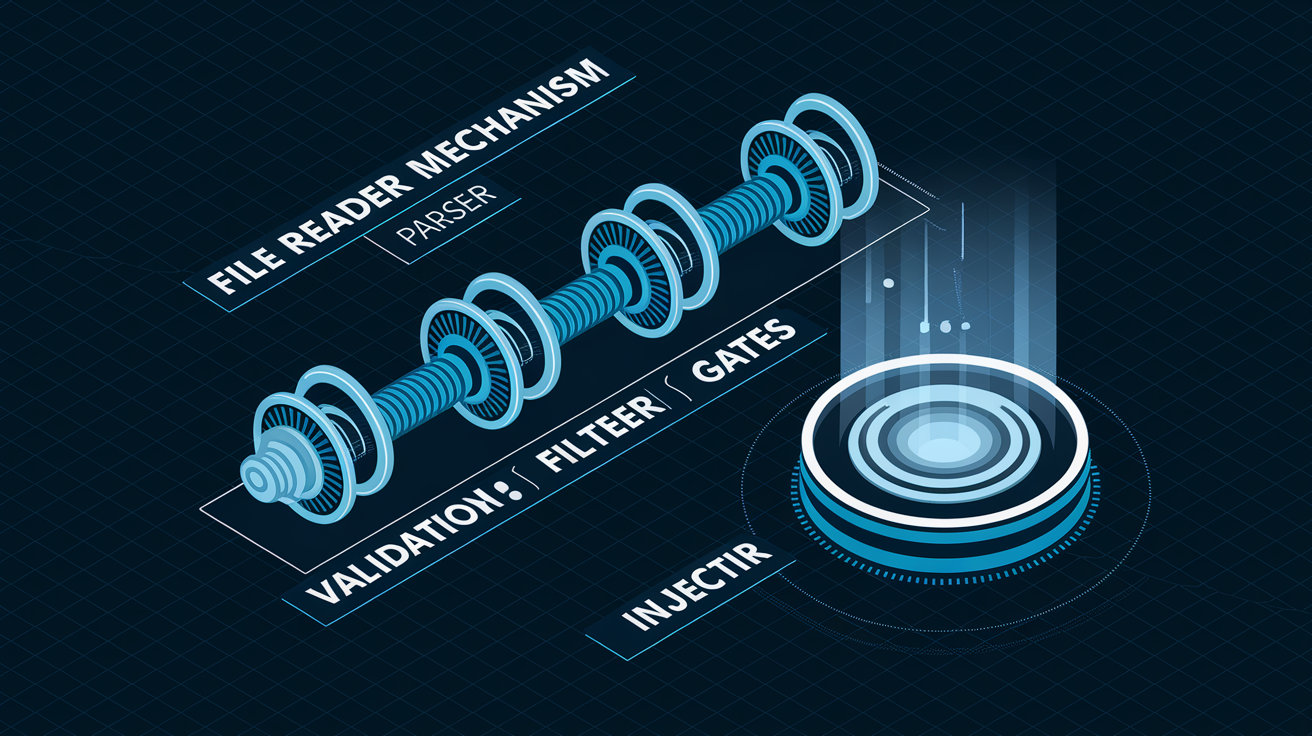
dotenv follows a specific sequence of operations when your application starts, transforming a text file into live configuration.
Reading the .env File
dotenv uses Node.js’s fs module to read the .env file from disk synchronously. It looks for the file in your project root by default, opening it as plain text and loading the entire contents into memory for processing.
Parsing Key Value Pairs
Regular expressions parse each line, extracting keys and values from the key=value format. The parser splits on the equals sign, treating everything before as the variable name and everything after as the value, handling quoted strings and basic escape sequences.
Validating and Filtering Content
dotenv skips blank lines and comments starting with #, ignoring any line that doesn’t match the key=value pattern. This validation prevents malformed entries from breaking your configuration and lets you document variables directly in the .env file.
Injecting into process.env
dotenv injects parsed variables into the global process.env object without overwriting existing variables. If a variable already exists in process.env from system configuration, dotenv leaves it alone by default. If .env contains PORT=3000 and you access process.env.PORT in your code, you get the string “3000”.
dotenv must execute before any code attempts to read environment variables, which is why it’s typically the first line in your entry file.
Installing and Using dotenv in Development

Install dotenv by running npm install dotenv in your project directory. This adds the package to your node_modules folder and updates package.json with the dependency.
The two main usage approaches are requiring dotenv at your application’s entry point or using Node.js’s preload flag to load it before your code runs.
Complete setup process:
- Install the package – Run
npm install dotenvin your terminal - Create your .env file – Add a file named
.envin your project root with entries likePORT=3000 - Load dotenv early – Add
require('dotenv').config()as the first line in your main file (like index.js or server.js) - Access variables – Read values using
process.env.PORTor other variable names you defined
require('dotenv').config()
const port = process.env.PORT || 3000
Alternatively, use the preload flag: node -r dotenv/config index.js
Node.js 20.6.0+ includes native support with the –env-file flag, reducing the need for the package. Run your application with node --env-file=.env index.js and Node will load variables automatically without requiring any additional dependencies.
Development vs Production Configuration Approaches

.env files are primarily for local development and onboarding new developers, providing convenience for running tests locally without complicated setup. When a new team member clones your repository, they create their own .env file based on documentation and start working immediately. Testing environments often use .env files too, since tests run locally or in ephemeral CI environments where file based configuration makes sense.
Production systems set actual environment variables through platform dashboards like Heroku config vars or Vercel environment settings, secret managers including AWS Systems Manager, Google Secret Manager, and Azure Key Vault, orchestration tools such as Docker env flags and Kubernetes Secrets, and CI/CD pipeline variables defined in GitHub Actions or GitLab CI. These approaches keep secrets out of your codebase entirely, storing them in encrypted systems designed for credential management. Production deployments typically set variables in hosting platform dashboards rather than uploading .env files.
dotenv is a development convenience tool while system variables are the production standard. This separation enables the same application code to run across development, staging, and production environments by only changing configuration values. Your code reads process.env.DATABASE_URL regardless of whether that value came from a .env file on your laptop or AWS Parameter Store in production. Most hosting services prefer environment variables because secrets can be rotated without code changes and the same build can deploy to multiple environments.
| Environment | Typical Approach | Tools/Methods |
|---|---|---|
| Development | .env file + dotenv package | Local .env file in project root, loaded via require(‘dotenv’).config() or –env-file flag |
| Testing | .env.test file or CI environment variables | Separate test configuration file or variables defined in GitHub Actions, GitLab CI, CircleCI |
| Staging | Platform managed environment variables | Cloud platform dashboards (Vercel, Netlify, Railway) with staging specific values |
| Production | Infrastructure level secret management | AWS Systems Manager, Google Secret Manager, Azure Key Vault, Kubernetes Secrets, Docker env flags |
Common dotenv Configuration Options

dotenv accepts configuration options to customize behavior beyond basic file loading.
Configuration options available:
- path – Specify a custom file location like
path: '.env.production'instead of the default.envin the project root, useful for maintaining separate configuration files per environment - encoding – Control file character encoding with values like ‘utf8’ or ‘latin1’, though utf8 is almost always correct
- debug – Enable logging mode with
debug: trueto see what dotenv is doing during the load process, helpful when troubleshooting why variables aren’t loading - override – Control whether dotenv replaces existing variables in process.env, defaults to false but can be set to true to force .env values to take precedence
- multiple files – Load multiple .env files where variables from the last file override previous files, added in Node.js 20.7.0 native support
- default values – Provide fallback configuration in code like
const port = process.env.PORT || 3000when optional variables might be missing
Alternative Packages to dotenv

The ecosystem offers specialized packages for specific needs that vanilla dotenv doesn’t address.
Each package addresses different pain points in configuration management, from validation to cross platform compatibility.
Alternative packages:
- dotenv-expand – Adds variable expansion support so you can reference other variables like
DATABASE_URL=postgresql://${DB_HOST}:${DB_PORT}/mydb - dotenv-safe – Validates that all required variables are defined by comparing against a .env.example file and failing if anything is missing
- cross-env – Sets environment variables in a cross platform way that works on Windows, Mac, and Linux with a single command syntax
- env-cmd – Runs commands with specific env files using
env-cmd -f .env.production npm startwithout modifying code - dotenv-webpack – Integrates environment variables into webpack bundling for frontend applications that need build time configuration
Security and Team Collaboration Practices

.env files should never be committed to version control because once secrets enter git history, they’re permanently accessible even if you delete them later. Every commit, every branch, every fork of your repository will contain those credentials. Attackers scan public repositories specifically looking for accidentally committed .env files containing database passwords and API keys.
The .env.example pattern documents required variables without exposing values, serving both security and team onboarding purposes. You commit a file showing DATABASE_URL= and API_KEY= without actual credentials, then developers copy this to .env and fill in their own values. This file acts as living documentation that stays updated as your configuration needs change, and it’s safe to share publicly.
Onboarding new developers is challenging when they need to know which variables to configure for the application to run. Without .env.example, you’re stuck maintaining separate documentation that gets out of sync. With it, setup instructions become “copy .env.example to .env and add your credentials.” Teams should commit .env.example files to show others what variables need to be set.
Combined security and team best practices:
- Add .env to .gitignore immediately – Do this before your first commit to prevent accidents, even if your .env file doesn’t exist yet
- Maintain an updated .env.example – Every time you add a new variable to .env, add the key (without value) to .env.example
- Document variable purposes in comments – Use comments in .env.example like
# Database connection string for PostgreSQL - Rotate secrets if accidentally committed – If you commit a .env file, assume those credentials are compromised and generate new ones immediately
- Separate frontend and backend variables – Frontend .env files can expose secrets since frontend variables are accessible to users in bundled JavaScript
- Validate required variables at startup – Fail fast if missing critical configuration rather than discovering problems when the code tries to use undefined values
- Provide setup instructions in README – Document the process of copying .env.example to .env and where to obtain credential values
- Establish naming conventions for consistency – Use uppercase with underscores like DATABASEURL and APIKEY_SECRET for clarity across the team
Troubleshooting dotenv Issues
Common scenarios where dotenv appears not to work usually come down to timing, paths, or precedence.
| Problem | Likely Cause | Solution |
|---|---|---|
| Variables showing as undefined | dotenv loaded after code tried to read process.env, or .env file in wrong location | Move require(‘dotenv’).config() to the very first line of your entry file, verify .env is in project root |
| Values not updating after changes | Application still running with old values cached in memory | Restart your application completely, dotenv only reads .env once at startup |
| dotenv not loading at all | Package not installed or .env file doesn’t exist | Run npm install dotenv and verify .env file exists with ls -la in project root |
| Wrong file being read | Working directory different from where .env lives, or path option pointing elsewhere | Use absolute path in config like path: require(‘path’).resolve(process.cwd(), ‘.env’) |
| Variables being overwritten unexpectedly | System environment variables conflicting with .env values, or override option set to true | Check if system variables exist with echo $VARIABLE_NAME, remember dotenv doesn’t overwrite by default |
Framework Specific dotenv Implementation
Different frameworks have specific patterns for dotenv integration and validation approaches that match their architecture.
Express.js and Backend Frameworks
Load dotenv at the server entry point before any routes or middleware by putting require('dotenv').config() at the top of your main server file. This ensures variables are available when you configure database connections, middleware settings, and route handlers.
Express applications typically read variables during server initialization to set the port, configure middleware like CORS with allowed origins, and establish database connections. Once the server starts, these values rarely change, making the single startup read efficient.
React and Frontend Applications
React requires the REACTAPP prefix for custom environment variables, and values are injected at build time rather than runtime. When you run npm run build, Create React App reads .env and bakes matching values into the bundled JavaScript, meaning changes require rebuilding the application.
Build time injection has security implications since all REACTAPP variables become visible in the browser’s JavaScript bundle. Never put API secrets in frontend .env files. Use these variables for things like feature flags, API endpoint URLs, and public configuration that’s safe to expose to users.
Next.js Built in Support
Next.js automatically loads .env files without requiring dotenv, prioritizing files based on environment and locality. The framework checks .env.local first for secrets that shouldn’t be committed, then .env.production or .env.development depending on the build mode, and finally the base .env file.
Variables prefixed with NEXTPUBLIC become available in browser JavaScript, while unprefixed variables stay server side only. This separation helps prevent accidentally exposing secrets. When you deploy to Vercel, the platform provides its own environment variable system that overrides local .env files.
Validation Across Frameworks
Fail fast when required variables are missing rather than discovering problems at runtime when a database connection fails or an API call uses undefined credentials.
Validation approaches include using joi for schema validation with type checking and required field enforcement, dotenv-safe which compares against .env.example and exits if variables are missing, or custom validation functions that check critical variables at startup and throw errors with helpful messages. Libraries like joi or dotenv-safe can validate that required environment variables are defined.
Validation scenarios to implement:
- Required variables – Check that DATABASEURL, APIKEY, and other critical values exist before starting the server
- Type checking – Verify numeric variables like PORT can be parsed to numbers and boolean flags are ‘true’ or ‘false’
- Format validation – Confirm URLs start with http:// or https://, email addresses contain @, and connection strings match expected patterns
- Allowed values – Restrict NODE_ENV to specific values like development, staging, or production rather than accepting any string
- Providing defaults – Supply fallback values for optional variables like
const timeout = process.env.TIMEOUT || 5000when missing variables shouldn’t crash the app
Performance and Optimization Considerations
dotenv adds minimal overhead since it runs once at startup, not on every request or function call.
File system reads happen synchronously during initialization, blocking execution briefly while the .env file is read and parsed. This typically takes a few milliseconds and doesn’t impact runtime performance since it happens before your application starts accepting requests. Once variables are loaded into process.env, accessing them is just a JavaScript object property lookup with no file I/O involved.
Production systems avoid this overhead entirely by using pre-set environment variables that already exist in process.env when Node.js starts. The operating system or platform loads these values before your application code runs, eliminating even the minimal startup cost of reading and parsing a file.
Final Words
Environment variables and dotenv serve different roles in your development workflow.
The difference between env and dotenv comes down to this: env represents the actual configuration values your application reads at runtime, while dotenv is the tool that loads those values from .env files during development.
In production, skip dotenv entirely and set variables directly through your hosting platform or secret manager.
For local development, dotenv bridges the gap between simple text files and the environment your code expects, making onboarding faster and configuration more consistent across your team.
Get your .env file set up once, add it to .gitignore, and you’re ready to build.
FAQ
Is dotenv still needed in modern Node.js projects?
Dotenv is no longer strictly needed for Node.js 20.6.0 and later because these versions include native .env file support using the –env-file flag. However, the dotenv package still offers useful features like variable expansion, validation libraries, and compatibility with older Node.js versions that many projects require.
Does dotenv override existing environment variables by default?
Dotenv does not override existing environment variables by default. The package intentionally skips variables already present in process.env to preserve system-level configurations, though this behavior can be changed using the override configuration option if needed.
What replaced dotenv in the Rust ecosystem?
The dotenvy crate replaced the original dotenv crate in Rust after the maintainer archived the dotenv repository. Dotenvy provides the same functionality for loading .env files into Rust applications while receiving active maintenance and security updates from the community.
How do you use .env files with the dotenv package?
You use .env files with dotenv by creating a .env file in your project root with key=value pairs, installing dotenv via npm, then adding require(‘dotenv’).config() at the top of your application’s entry file before any other code accesses process.env variables.